
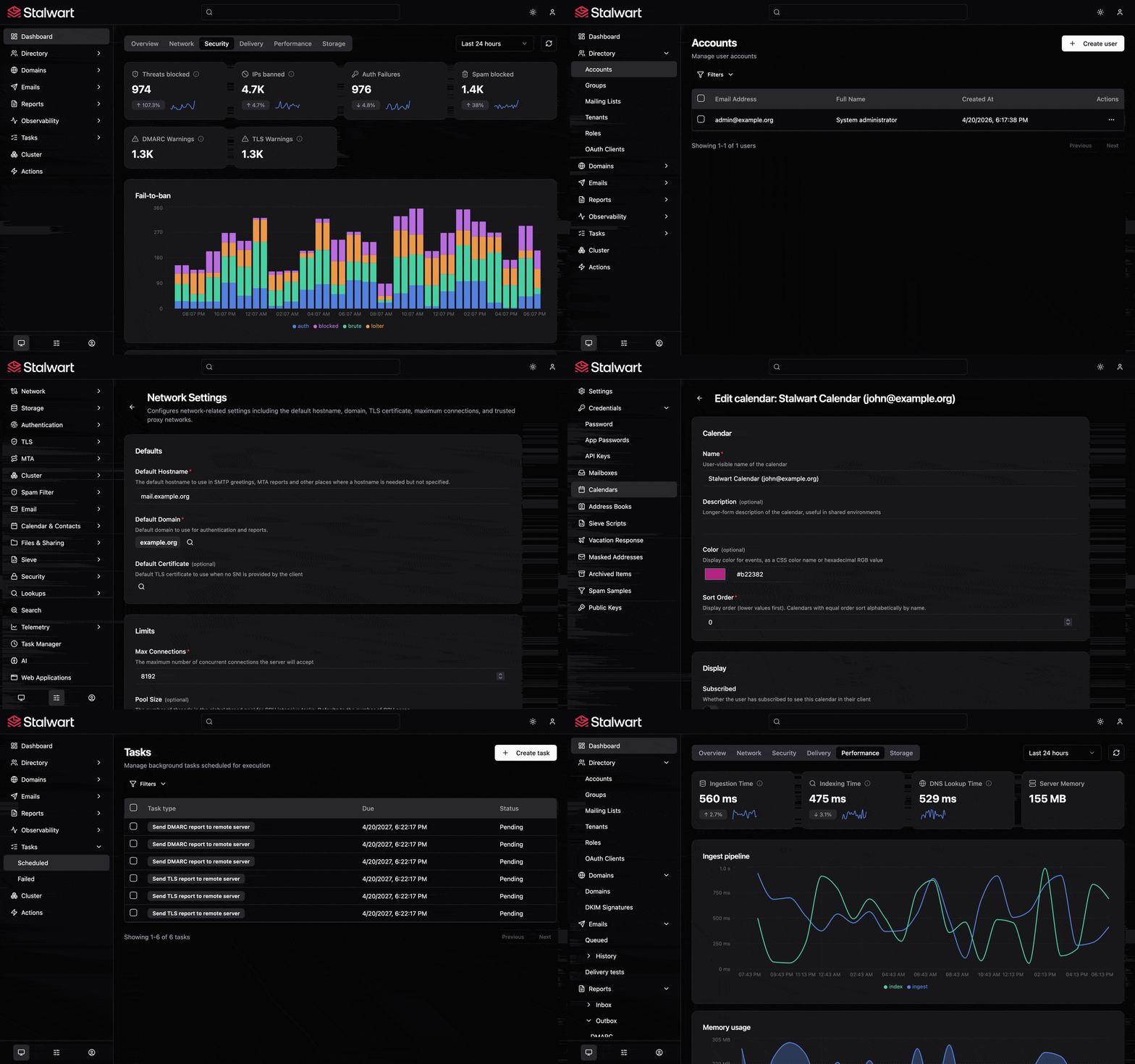
Community fork of stalwartlabs/webui with UI improvements and fixes.







 ## Get Started
Stalwart WebUI ships as part of Stalwart Mail Server. To install Stalwart Mail Server on your server, follow the instructions for your platform:
- [Linux / MacOS](https://stalw.art/docs/install/linux)
- [Windows](https://stalw.art/docs/install/windows)
- [Docker](https://stalw.art/docs/install/docker)
All documentation is available at [stalw.art/docs/get-started](https://stalw.art/docs/get-started). Note that a standard Stalwart install ships the **official** WebUI; see [Switching your server to this fork's UI](#switching-your-server-to-this-forks-ui) below to point your server at this fork instead.
## Switching your server to this fork's UI
Stalwart serves its admin UI as a managed `WEBAPP` application, downloaded from a URL you control — switching to this fork (or back to upstream) is a server-side config change, no rebuild or redeploy of Stalwart itself required. This is done with [`stalwart-cli`](https://github.com/stalwartlabs/cli).
On your server:
```
export STALWART_URL=https://subdomain.domain.com
export STALWART_USER='user@domain.com'
export STALWART_PASSWORD='Password'
```
Find the id of your `WEBAPP` application:
```
stalwart-cli query Application
```
Point it at this fork's latest release instead of upstream's:
```
stalwart-cli update Application ID WEBAPP \
--field https://github.com/LinkPhoenix/stalwart-webui-fork/releases/latest/download/webui.zip
```
Then trigger the update:
```
stalwart-cli create Action/UpdateApps
```
Every tagged release of this fork publishes a `webui.zip` build via CI (see [`.github/workflows/build.yml`](.github/workflows/build.yml)), so pointing at `releases/latest/download/webui.zip` always fetches the newest tested build. To go back to the official UI, repeat the `update` step with `https://github.com/stalwartlabs/webui/releases/latest/download/webui.zip`.
## Getting started
Prerequisites:
- Node.js 18 or later
- A running Stalwart instance (for JMAP API calls) — see [DEVELOPMENT.md](DEVELOPMENT.md) for how to spin up a disposable local test server with Docker, no manual Stalwart setup required.
Install dependencies:
```
npm install
```
### Environment variables
Configuration is done through Vite environment variables. Copy or edit `.env.development` in the project root:
```
VITE_API_BASE_URL=http://localhost:443
VITE_OAUTH_CLIENT_ID=stalwart-webui
VITE_ACCESS_TOKEN=
VITE_OAUTH_SCOPES=
```
| Variable | Description |
|---|---|
| `VITE_API_BASE_URL` | URL of the Stalwart server. Used for all API requests during development. In production builds (when empty or unset) requests are relative to the current origin. |
| `VITE_OAUTH_CLIENT_ID` | OAuth 2.0 client ID. Defaults to `stalwart-webui`. |
| `VITE_ACCESS_TOKEN` | When set, skips the OAuth flow entirely and uses this token for all requests. Useful for local development and testing. |
| `VITE_OAUTH_SCOPES` | Optional OAuth scopes. Omitted from the authorization request when empty. |
### Bypassing OAuth for development
Set `VITE_ACCESS_TOKEN` to a valid bearer token to skip the login page and go straight to the admin panel:
```
VITE_ACCESS_TOKEN=your-bearer-token-here
```
Against the local test server from [DEVELOPMENT.md](DEVELOPMENT.md), `scripts/dev-token.ps1` / `scripts/dev-token.sh` fetch one for you automatically.
### Running the dev server
```
npm run dev
```
This starts Vite's development server with hot module replacement, typically at `http://localhost:5173`.
## Testing
Run the unit tests (Vitest):
```
npm test
```
Run tests in watch mode:
```
npm run test:watch
```
## Building for production
```
npm run build
```
This runs the TypeScript compiler followed by Vite's production build. Output
goes to the `dist/` directory.
To preview the production build locally:
```
npm run preview
```
## Support
For bugs or questions about **this fork's UI changes**, please open an issue on [this repository](https://github.com/LinkPhoenix/stalwart-webui-fork).
For anything related to Stalwart Mail Server itself, do not hesitate to reach the upstream team on [Github Discussions](https://github.com/stalwartlabs/mail-server/discussions),
[Reddit](https://www.reddit.com/r/stalwartlabs), [Discord](https://discord.gg/aVQr3jF8jd) or [Matrix](https://matrix.to/#/#stalwart:matrix.org).
Additionally you may purchase a subscription to obtain priority support from Stalwart Labs LLC.
## License
This project is dual-licensed under the **GNU Affero General Public License v3.0** (AGPL-3.0; as published by the Free Software Foundation) and the **Stalwart Enterprise License v1 (SELv1)**:
- The [GNU Affero General Public License v3.0](./LICENSES/AGPL-3.0-only.txt) is a free software license that ensures your freedom to use, modify, and distribute the software, with the condition that any modified versions of the software must also be distributed under the same license.
- The [Stalwart Enterprise License v1 (SELv1)](./LICENSES/LicenseRef-SEL.txt) is a proprietary license designed for commercial use. It offers additional features and greater flexibility for businesses that do not wish to comply with the AGPL-3.0 license requirements.
Each file in this project contains a license notice at the top, indicating the applicable license(s). The license notice follows the [REUSE guidelines](https://reuse.software/) to ensure clarity and consistency. The full text of each license is available in the [LICENSES](./LICENSES/) directory.
As a fork, all changes made here — including new files added by this fork — remain under the same dual license as the upstream project; this is reflected in the SPDX license notice at the top of every source file.
## Copyright
Copyright (C) 2024, Stalwart Labs LLC
## Get Started
Stalwart WebUI ships as part of Stalwart Mail Server. To install Stalwart Mail Server on your server, follow the instructions for your platform:
- [Linux / MacOS](https://stalw.art/docs/install/linux)
- [Windows](https://stalw.art/docs/install/windows)
- [Docker](https://stalw.art/docs/install/docker)
All documentation is available at [stalw.art/docs/get-started](https://stalw.art/docs/get-started). Note that a standard Stalwart install ships the **official** WebUI; see [Switching your server to this fork's UI](#switching-your-server-to-this-forks-ui) below to point your server at this fork instead.
## Switching your server to this fork's UI
Stalwart serves its admin UI as a managed `WEBAPP` application, downloaded from a URL you control — switching to this fork (or back to upstream) is a server-side config change, no rebuild or redeploy of Stalwart itself required. This is done with [`stalwart-cli`](https://github.com/stalwartlabs/cli).
On your server:
```
export STALWART_URL=https://subdomain.domain.com
export STALWART_USER='user@domain.com'
export STALWART_PASSWORD='Password'
```
Find the id of your `WEBAPP` application:
```
stalwart-cli query Application
```
Point it at this fork's latest release instead of upstream's:
```
stalwart-cli update Application ID WEBAPP \
--field https://github.com/LinkPhoenix/stalwart-webui-fork/releases/latest/download/webui.zip
```
Then trigger the update:
```
stalwart-cli create Action/UpdateApps
```
Every tagged release of this fork publishes a `webui.zip` build via CI (see [`.github/workflows/build.yml`](.github/workflows/build.yml)), so pointing at `releases/latest/download/webui.zip` always fetches the newest tested build. To go back to the official UI, repeat the `update` step with `https://github.com/stalwartlabs/webui/releases/latest/download/webui.zip`.
## Getting started
Prerequisites:
- Node.js 18 or later
- A running Stalwart instance (for JMAP API calls) — see [DEVELOPMENT.md](DEVELOPMENT.md) for how to spin up a disposable local test server with Docker, no manual Stalwart setup required.
Install dependencies:
```
npm install
```
### Environment variables
Configuration is done through Vite environment variables. Copy or edit `.env.development` in the project root:
```
VITE_API_BASE_URL=http://localhost:443
VITE_OAUTH_CLIENT_ID=stalwart-webui
VITE_ACCESS_TOKEN=
VITE_OAUTH_SCOPES=
```
| Variable | Description |
|---|---|
| `VITE_API_BASE_URL` | URL of the Stalwart server. Used for all API requests during development. In production builds (when empty or unset) requests are relative to the current origin. |
| `VITE_OAUTH_CLIENT_ID` | OAuth 2.0 client ID. Defaults to `stalwart-webui`. |
| `VITE_ACCESS_TOKEN` | When set, skips the OAuth flow entirely and uses this token for all requests. Useful for local development and testing. |
| `VITE_OAUTH_SCOPES` | Optional OAuth scopes. Omitted from the authorization request when empty. |
### Bypassing OAuth for development
Set `VITE_ACCESS_TOKEN` to a valid bearer token to skip the login page and go straight to the admin panel:
```
VITE_ACCESS_TOKEN=your-bearer-token-here
```
Against the local test server from [DEVELOPMENT.md](DEVELOPMENT.md), `scripts/dev-token.ps1` / `scripts/dev-token.sh` fetch one for you automatically.
### Running the dev server
```
npm run dev
```
This starts Vite's development server with hot module replacement, typically at `http://localhost:5173`.
## Testing
Run the unit tests (Vitest):
```
npm test
```
Run tests in watch mode:
```
npm run test:watch
```
## Building for production
```
npm run build
```
This runs the TypeScript compiler followed by Vite's production build. Output
goes to the `dist/` directory.
To preview the production build locally:
```
npm run preview
```
## Support
For bugs or questions about **this fork's UI changes**, please open an issue on [this repository](https://github.com/LinkPhoenix/stalwart-webui-fork).
For anything related to Stalwart Mail Server itself, do not hesitate to reach the upstream team on [Github Discussions](https://github.com/stalwartlabs/mail-server/discussions),
[Reddit](https://www.reddit.com/r/stalwartlabs), [Discord](https://discord.gg/aVQr3jF8jd) or [Matrix](https://matrix.to/#/#stalwart:matrix.org).
Additionally you may purchase a subscription to obtain priority support from Stalwart Labs LLC.
## License
This project is dual-licensed under the **GNU Affero General Public License v3.0** (AGPL-3.0; as published by the Free Software Foundation) and the **Stalwart Enterprise License v1 (SELv1)**:
- The [GNU Affero General Public License v3.0](./LICENSES/AGPL-3.0-only.txt) is a free software license that ensures your freedom to use, modify, and distribute the software, with the condition that any modified versions of the software must also be distributed under the same license.
- The [Stalwart Enterprise License v1 (SELv1)](./LICENSES/LicenseRef-SEL.txt) is a proprietary license designed for commercial use. It offers additional features and greater flexibility for businesses that do not wish to comply with the AGPL-3.0 license requirements.
Each file in this project contains a license notice at the top, indicating the applicable license(s). The license notice follows the [REUSE guidelines](https://reuse.software/) to ensure clarity and consistency. The full text of each license is available in the [LICENSES](./LICENSES/) directory.
As a fork, all changes made here — including new files added by this fork — remain under the same dual license as the upstream project; this is reflected in the SPDX license notice at the top of every source file.
## Copyright
Copyright (C) 2024, Stalwart Labs LLC